
LibreBridge Mini Manual
Complete setup guide and technical documentation
Getting Started
Welcome to your LibreBridge Mini! This guide will help you set up and start using your accessibility switch interface in just a few simple steps.
Open Source Project
LibreBridge is an open source project which means the products are truly yours. You can copy, modify, and even sell our designs. The objective is to foster open solutions with a high degree of quality and usability. Please checkout our repositories.
What's in the Box
- LibreBridge Mini device
- USB-C cable
What You'll Need
- Computer or mobile device with USB-C port
- Internet connection
- Your accessibility switches
- Web browser
Step-by-Step Setup
Connect Your Device
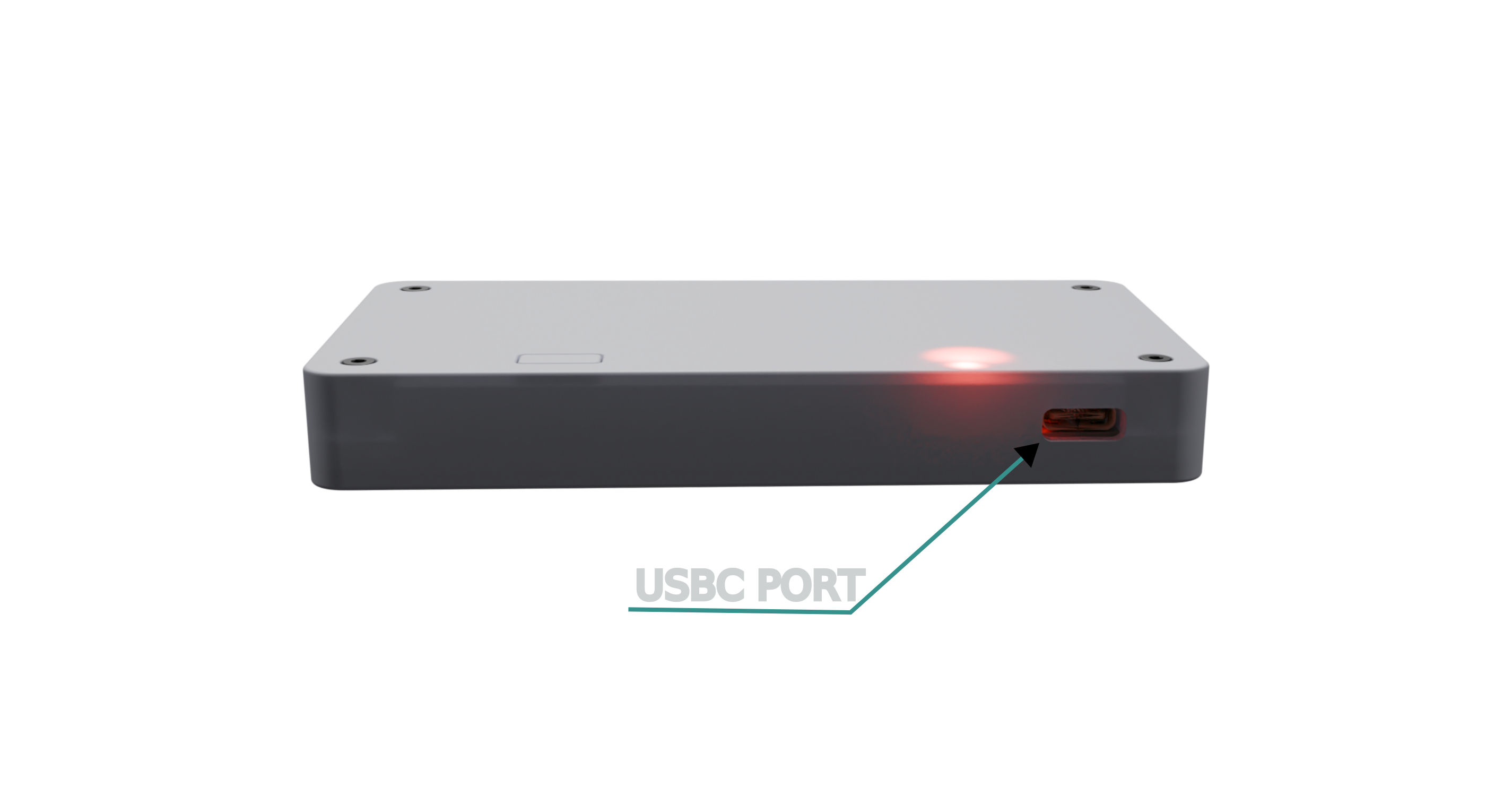
Connect the LibreBridge Mini to your computer using the included USB-C cable. The device will power on automatically and the LED will turn green while initializing.
Configure Your Settings
Visit our web-based configurator to set up your switch mappings and preferences:
Open ConfiguratorConfigure your switch inputs, choose actions (keyboard keys, mouse clicks, etc.), and set up multiple modes if needed.
Download and Install Configuration
After configuring your settings:
- Download the configuration file from the configurator. The configuration file ends
with
.json - Copy the file to your LibreBridge's drive.
📁 LibreBridge Drive
config.json
Switch Configuration
information.json
Firmware version & hardware info
Load Your Configuration
To activate your new configuration:
- Hold the mode button on your device for 3 seconds.
- The LED will flash green 3 times rapidly.
- The device will reset and load your new settings (USB drive will remount as device reboots).
Connect Your Switches
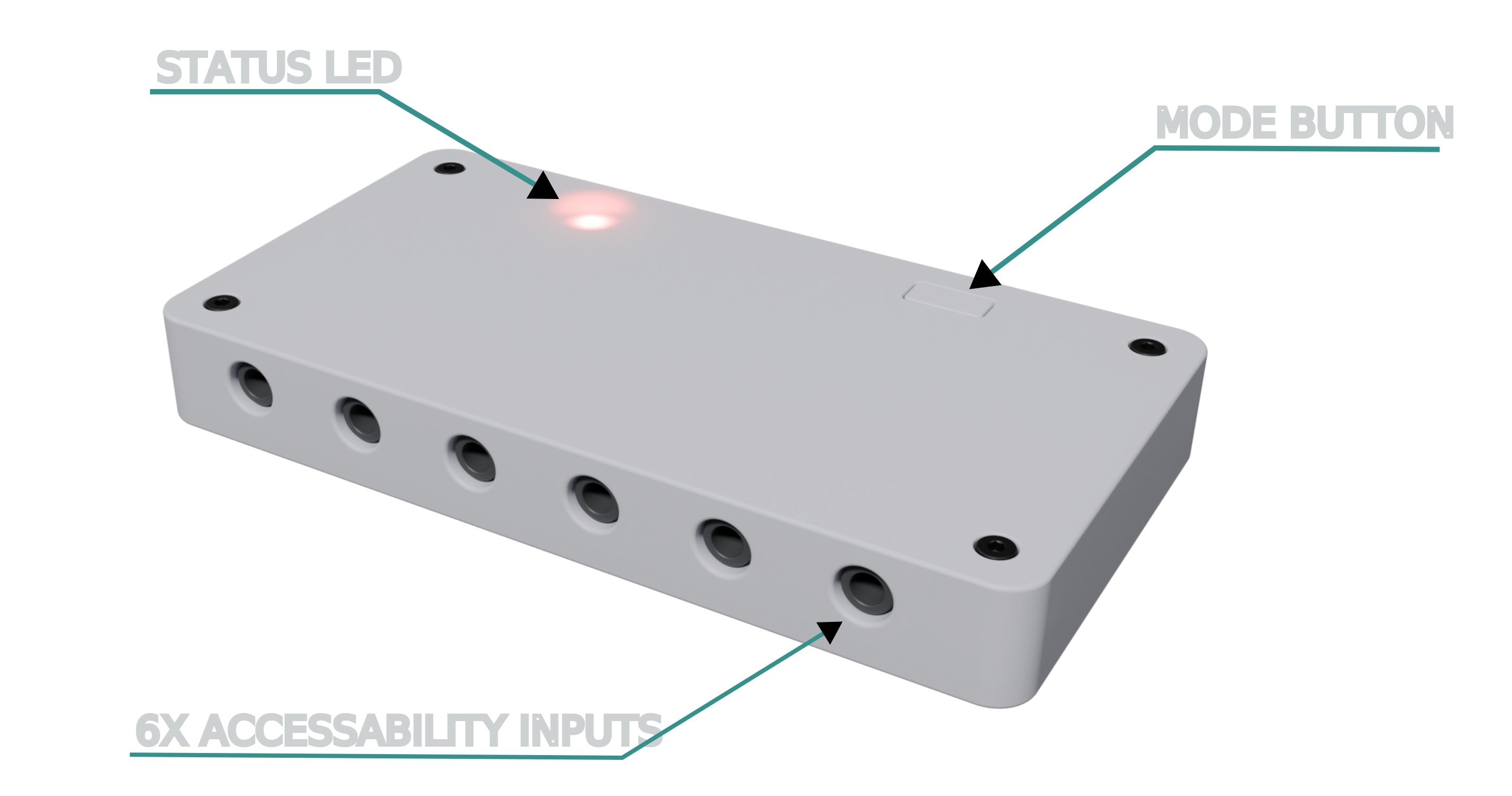
Connect your accessibility switches to the 3.5mm ports on the device. You can now use your switches to control your computer according to your configuration.
Press the mode button once to cycle between different modes if you've configured multiple modes.
Common Use Cases
Computer Navigation
Set up switches for arrow keys, Enter, and Escape to navigate menus and applications.
Gaming
Configure switches for game controls like WASD movement or specific game actions.
Communication Software
Set up switches for common phrases or actions in communication applications.
Multiple Environments
Use different modes for different activities — one for navigation, one for entertainment.
Technical Documentation
Hardware Specifications
Physical Specifications
- 6 × 3.5mm accessibility switch ports
- 1 × USB-C port (data + power)
- 1 × RGB LED status indicator
- 1 × Mode selection button
- Compact form factor (55 x 105 x 15 mm)
Electrical Specifications
- USB-C powered (5V@<500mA)
- Switch input: 3.5mm TRS/TS
- USB 2.0 compatible
- HID compliant
LED Status Indicators
| Color | Pattern | Duration | Description |
|---|---|---|---|
| Green | Solid | Startup | Device initializing, parsing filesystem |
| Green | 3 rapid flashes | 0.1s each | Configuration/firmware loaded successfully |
| Red | 10 flashes | 1s each | Initialization failed - device will reset |
| Red | 3 rapid flashes | 0.1s each | Configuration file parse error |
| Red | 3 flashes | 1s each | Firmware image parse error |
| Yellow | Solid | Variable | Processing firmware update |
| White | Solid | Startup | Factory reset pending |
| White | 3 flashes | 1s | Factory reset successful |
| Custom | Solid | Operating | Current mode indicator (user-configurable) |
Mode Button
| Action | Timing | State | Result |
|---|---|---|---|
| Single Press | < 1s | Any | Switch to next operating mode |
| Hold | 3 seconds | Any | Device reset - reload config/firmware |
| Hold | 60 seconds | Power-on only | ⚠️ Factory reset - restores firmware and wipes storage ⚠️ |
Device Information
You can check the current firmware version by opening the information.json file stored on the device:
{
  "serial_number": "26130001",
  "model": "mini",
  "hardware_version": "v1.0.0",
  "firmware_version": "v1.0.0-rc4",
  "idf_version": "v5.2.6",
  "build_date": "Jun 27 2026",
  "build_time": "14:27:00",
  "hmac_hash": "672207ed15fc0b54763..."
}
The firmware_version key tells you which release is currently flashed on the unit.
Compare it against the latest versions to decide whether an update is needed.
Firmware Upgrade
Latest Releases
The latest firmware images are listed below. Click a version to download the firmware binary directly. The file downloaded will have a specific and expected file name.
| Device | Stable | Beta | Expected File Name |
|---|---|---|---|
| LibreBridge Mini v1 | v0.0.6 | v1.0.0-rc6 | mini_v1.bin |
| LibreBridge Mini v2 | Firmware downloads will be available when the device ships. | ||
Upgrade Process
The LibreBridge Mini firmware is easily upgraded. Follow the directions below to upgrade your unit.
- Download the firmware image file (
.bin). The file name is specific and must match the expected file name otherwise the upgrade process will fail. - Connect the device and copy the firmware image file into the unit. Transferring the image can take 10s of seconds. Your drive should look like this:
📁 LibreBridge Drive
config.json
Switch configuration
information.json
Firmware version & hardware info
mini_v1.bin
Firmware image
- Hold the mode button for 3 seconds to trigger the update.
- The LED will turn yellow during the update process.
- Device will reset automatically when complete and flash slowly green three times when the upgrade is successful. The device information will be updated to reflect the new firmware version.
Configuration File Format
The configuration tool contains syntax highlighting, linting, and auto completion so power users can confidently modify the configuration file directly.
{
  "version": "0.0.0",
  "name": "Sample Configuration",
  "mode": [
    {
      "name": "Good Mode",
      "color": [
        255,
        255,
        0
      ],
      "config": [
        {
          "logic": {
            "type": "direct"
          },
          "input": {
            "type": "switch",
            "id": 0
          },
          "output": [
            {
              "type": "keyboard",
              "code": [
                4
              ],
              "modifiers": {
                "shift": false,
                "ctrl": false,
                "alt": false,
                "meta": false
              }
            }
          ]
        },
        {
          "logic": {
            "type": "direct"
          },
          "input": {
            "type": "switch",
            "id": 1
          },
          "output": [
            {
              "type": "keyboard",
              "code": [
                5
              ],
              "modifiers": {
                "shift": false,
                "ctrl": false,
                "alt": false,
                "meta": false
              }
            }
          ]
        },
        {
          "logic": {
            "type": "direct"
          },
          "input": {
            "type": "switch",
            "id": 2
          },
          "output": [
            {
              "type": "keyboard",
              "code": [
                6
              ],
              "modifiers": {
                "shift": false,
                "ctrl": false,
                "alt": false,
                "meta": false
              }
            }
          ]
        },
        {
          "logic": {
            "type": "direct"
          },
          "input": {
            "type": "switch",
            "id": 3
          },
          "output": [
            {
              "type": "keyboard",
              "code": [
                7
              ],
              "modifiers": {
                "shift": false,
                "ctrl": false,
                "alt": false,
                "meta": false
              }
            }
          ]
        },
        {
          "logic": {
            "type": "direct"
          },
          "input": {
            "type": "switch",
            "id": 4
          },
          "output": [
            {
              "type": "keyboard",
              "code": [
                8
              ],
              "modifiers": {
                "shift": false,
                "ctrl": false,
                "alt": false,
                "meta": false
              }
            }
          ]
        },
        {
          "logic": {
            "type": "direct"
          },
          "input": {
            "type": "switch",
            "id": 5
          },
          "output": [
            {
              "type": "keyboard",
              "code": [
                9
              ],
              "modifiers": {
                "shift": false,
                "ctrl": false,
                "alt": false,
                "meta": false
              }
            }
          ]
        }
      ]
    },
    {
      "name": "mode x",
      "color": [
        0,
        255,
        0
      ],
      "config": [
        {
          "logic": {
            "type": "direct"
          },
          "input": {
            "type": "switch",
            "id": 0
          },
          "output": [
            {
              "type": "keyboard",
              "code": [
                4
              ],
              "modifiers": {
                "shift": true,
                "ctrl": false,
                "alt": false,
                "meta": false
              }
            }
          ]
        },
        {
          "logic": {
            "type": "direct"
          },
          "input": {
            "type": "switch",
            "id": 1
          },
          "output": [
            {
              "type": "keyboard",
              "code": [
                5
              ],
              "modifiers": {
                "shift": true,
                "ctrl": false,
                "alt": false,
                "meta": false
              }
            }
          ]
        },
        {
          "logic": {
            "type": "direct"
          },
          "input": {
            "type": "switch",
            "id": 2
          },
          "output": [
            {
              "type": "keyboard",
              "code": [
                6
              ],
              "modifiers": {
                "shift": true,
                "ctrl": false,
                "alt": false,
                "meta": false
              }
            }
          ]
        },
        {
          "logic": {
            "type": "direct"
          },
          "input": {
            "type": "switch",
            "id": 3
          },
          "output": [
            {
              "type": "keyboard",
              "code": [
                7
              ],
              "modifiers": {
                "shift": true,
                "ctrl": false,
                "alt": false,
                "meta": false
              }
            }
          ]
        },
        {
          "logic": {
            "type": "direct"
          },
          "input": {
            "type": "switch",
            "id": 4
          },
          "output": [
            {
              "type": "keyboard",
              "code": [
                8
              ],
              "modifiers": {
                "shift": true,
                "ctrl": false,
                "alt": false,
                "meta": false
              }
            }
          ]
        },
        {
          "logic": {
            "type": "direct"
          },
          "input": {
            "type": "switch",
            "id": 5
          },
          "output": [
            {
              "type": "keyboard",
              "code": [
                9
              ],
              "modifiers": {
                "shift": true,
                "ctrl": false,
                "alt": false,
                "meta": false
              }
            }
          ]
        }
      ]
    },
    {
      "name": "mode x",
      "color": [
        0,
        0,
        255
      ],
      "config": [
        {
          "logic": {
            "type": "direct"
          },
          "input": {
            "type": "switch",
            "id": 0
          },
          "output": [
            {
              "type": "keyboard",
              "code": [
                23
              ],
              "modifiers": {
                "shift": false,
                "ctrl": false,
                "alt": false,
                "meta": true
              }
            }
          ]
        },
        {
          "logic": {
            "type": "direct"
          },
          "input": {
            "type": "switch",
            "id": 1
          },
          "output": [
            {
              "type": "keyboard",
              "code": [
                70
              ],
              "modifiers": {
                "shift": false,
                "ctrl": false,
                "alt": false,
                "meta": false
              }
            }
          ]
        },
        {
          "logic": {
            "type": "direct"
          },
          "input": {
            "type": "switch",
            "id": 2
          },
          "output": [
            {
              "type": "keyboard",
              "code": [
                61
              ],
              "modifiers": {
                "shift": false,
                "ctrl": false,
                "alt": true,
                "meta": false
              }
            }
          ]
        },
        {
          "logic": {
            "type": "direct"
          },
          "input": {
            "type": "switch",
            "id": 3
          },
          "output": [
            {
              "type": "keyboard",
              "code": [
                14
              ],
              "modifiers": {
                "shift": false,
                "ctrl": false,
                "alt": true,
                "meta": false
              }
            }
          ]
        }
      ]
    }
  ]
}
Troubleshooting
Try these steps:
- Try a different USB-C cable
- Try a different USB port on your computer
- Restart your computer
- Check if the LED is illuminated when connected
Ensure that:
- The file is in the root directory of the device
- You held the mode button for exactly 3 seconds
- The LED flashed green 3 times after button press
Check these items:
- Switches are properly connected to 3.5mm ports
- Configuration has been loaded successfully
- You're in the correct mode (check LED color)
- Test switches with a different device to verify they work
Support & Resources
Community Resources
Connect with other users, share configurations, and get tips from the community.